One of the primary reasons users abandon a website is slow loading speed. When a site takes too long to load, visitors are far more likely to leave rather than wait. This leads to poor user experience, reduced engagement, and lost opportunities. Since most websites consist of multiple pages, it becomes essential to optimize the loading speed of each page to ensure a smooth and consistent experience.
Achieving optimal loading performance requires a clear understanding of the factors that influence speed. Key elements include the number and size of media files such as images and videos, the efficiency of server-side scripts, and the impact of themes and plugins used in the website. Each of these components plays a significant role in determining how quickly a page loads.
In essence, media assets, server-side processing, and design elements like themes and plugins collectively affect website performance in different ways. Applying the right strategies to manage and optimize these factors is crucial for improving loading speed and enhancing overall user interaction. When designing and developing a website, it is important to remember that users have little patience for delays. Prioritizing performance from the outset helps create a faster, more reliable experience that meets user expectations.
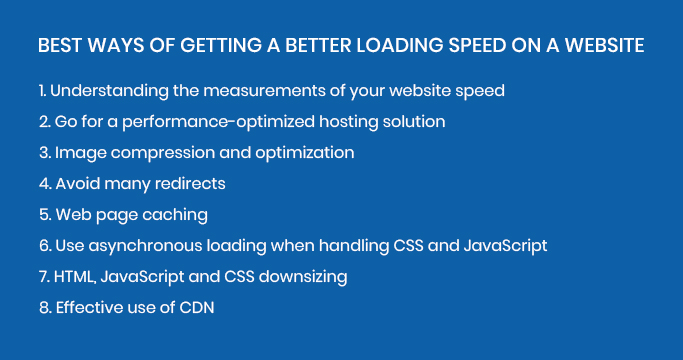
Ways of getting a better loading speed on a website
Browsing the web is expected to be fast and seamless. Even a slight delay can frustrate users, and every second counts when accessing online content. Studies consistently show that many users abandon a website if its loading time increases from around one second to three seconds. This makes it essential for your website, and each of its pages, to load within an optimal timeframe. Faster loading speeds not only improve user satisfaction but also drive higher engagement and better conversion rates.
Website speed is not just about user experience; it also plays a vital role in search engine optimization. Search engines evaluate multiple factors when ranking websites, and loading speed is a key contributor. Faster websites are more likely to rank higher in search results, while slower ones often struggle to gain visibility. As a result, optimizing your website’s performance can significantly improve your chances of attracting organic traffic.
Speed also shapes how users perceive your brand. A fast, responsive website creates a sense of professionalism and reliability, while slow loading times can leave a negative impression. Users tend to associate sluggish performance with poor quality, which can discourage them from returning. For businesses aiming to build trust and grow their brand, maintaining optimal website speed is essential.
Effective performance optimization requires careful attention to multiple aspects of your website. From managing media files to refining backend processes, every element plays a role in delivering a smooth experience. The following sections outline practical techniques to help improve your website’s performance and ensure consistently fast loading speeds.
1. Understanding the measurements of your website speed
You should avoid making changes to a website without first understanding its current performance. Before attempting any speed optimization, it is essential to test your website and establish a clear baseline. Measuring loading speed helps you identify existing issues and determine where improvements are needed.
Evaluating your website’s performance involves using reliable speed testing tools. Popular options include GTmetrix, Pingdom Website Speed Test, and Google PageSpeed Insights. These tools provide detailed insights into how your website performs across both desktop and mobile devices, making them highly valuable for developers and site owners.
By using these tools, you can analyze key performance metrics such as load time, page size, and resource usage. They also highlight specific issues that may be slowing down your website, allowing you to make informed decisions. Once you have a clear understanding of your site’s current performance, you can begin implementing targeted optimizations.
With this foundation in place, it becomes much easier to apply effective strategies that improve loading speed. The following sections will explore a range of techniques to help you maintain optimal performance and deliver a smooth, efficient user experience.
2. Go for a performance-optimized hosting solution
There are various hosting solutions available, each with its own approach to delivering website hosting. While their features and configurations may differ, all of them play a critical role in managing your website and directly impact its overall performance. From server response times to resource allocation, your hosting environment significantly influences how efficiently your website operates.
Choosing the right hosting provider is therefore essential for achieving fast loading speeds and reliable performance. Issues often arise when individuals or businesses opt for low-cost hosting without considering performance factors. While budget is important, selecting a hosting provider based solely on price can lead to slower load times, limited resources, and an overall poor user experience.
Instead, it is important to prioritize performance when making your decision. Opt for hosting solutions that are designed with speed, scalability, and reliability in mind. A high-performance hosting provider ensures better loading times, smoother functionality, and a more responsive website, ultimately supporting both user satisfaction and long-term growth.
3. Image compression and optimization
Images are one of the most common factors that slow down a website. While high-quality visuals enhance design and engagement, they can significantly increase page load times if not properly managed. Both the resolution and file size of an image play a crucial role in overall performance.
To improve loading speed, it is important to optimize all images used on your website. This involves reducing file sizes without noticeably affecting visual quality. Image compression is a key technique here, allowing you to shrink files to a more efficient size for faster loading.
There are several effective methods to optimize images. You can implement lazy loading so images only load when they are needed, use lossy or lossless compression depending on your quality requirements, and switch to modern formats like WebP or AVIF for better efficiency. Additionally, using plugins or automated tools can simplify the optimization process by handling compression and format conversion across your entire website.
By carefully optimizing images, you can maintain visual appeal while ensuring a faster, smoother user experience.
4. Avoid many redirects
Redirects are a common factor that can slow down your website’s loading speed. While they are sometimes necessary for maintaining proper navigation and SEO, excessive or poorly configured redirects can increase load times and negatively impact user experience. Each redirect creates an additional request-response cycle, which adds delay before the final page is displayed.
To improve performance, it is important to review your redirects and remove any that are unnecessary. Eliminating redundant or outdated redirects helps reduce loading time. You can also minimize the need for redirects by avoiding broken or unhelpful links and ensuring that essential redirects are set up correctly from the start. A clean and efficient redirect structure contributes to faster page loads and a smoother browsing experience.
5. Web page caching
Caching is a crucial technique for improving website speed and performance. It works by storing temporary copies of your website’s files so they can be delivered more quickly to users. By reducing the need to repeatedly fetch the same data from the server, caching helps minimize server load and allows the website to run more smoothly.
With caching in place, many requests are served directly from the cache instead of being processed from scratch. This significantly reduces page load times, as frequently accessed resources such as images, stylesheets, and scripts are readily available. As a result, users experience faster and more seamless browsing, while the server handles fewer requests, improving overall efficiency.
5. Use asynchronous loading when handling CSS and JavaScript
Your website relies on JavaScript and CSS to function and display properly, but how these files are loaded can significantly impact performance. By using techniques like asynchronous (async) and deferred (defer) loading, you can control how scripts are executed without slowing down the page.
In simple terms, browsers typically load files in the order they appear, which can delay rendering if scripts block other elements from loading. Since JavaScript execution can take time, it may prevent essential content from appearing quickly, leading to a slower user experience.
To improve performance, you can restructure how these files are loaded. Using defer ensures that scripts are executed only after the HTML has been fully parsed, while async allows certain scripts to load independently without blocking other resources. This prevents unnecessary delays and ensures that critical content loads first.
Additionally, optimizing your code so that multiple resources can load simultaneously helps enhance overall speed. Properly managing how JavaScript and CSS are delivered ensures a smoother, faster, and more responsive website experience for users.
6. HTML, JavaScript and CSS downsizing
Optimizing the web files associated with your website is a fundamental step toward achieving faster loading speeds. This process can be taken further by refining your HTML, CSS, and JavaScript files through minification. Minification involves removing unnecessary elements such as comments, extra spaces, and unused code, resulting in lighter and more efficient files that load more quickly when deployed.
In addition to improving performance, minified code is cleaner and more streamlined, which contributes to better overall site efficiency. While manually reviewing and optimizing every line of code can be time-consuming, there are many tools available to simplify the process. Automated solutions and online tools, such as HTML Minifier, can handle code minification effectively, saving time while ensuring your website remains optimized for speed.
7. Effective use of CDN
Improving the loading speeds in your website is possible with the Content Delivery Network. It is thus effective to use the CDN when working on larger web projects.
Conclusion
Loading speed plays a decisive role in whether visitors choose to stay on your website or leave. It is therefore essential to adopt and implement strategies that maintain consistently optimal performance. Eliminating unnecessary plugins and following proven optimization techniques can significantly improve your site’s speed and efficiency.
Make it a habit to monitor your website’s performance metrics regularly, as this helps you identify issues early and maintain high standards. By prioritizing speed and ongoing optimization, you not only enhance user experience but also create a more reliable and engaging platform for your visitors.